AI Output Gets Better When Your Workflow Gets Stricter
The biggest gains in AI-assisted Java development often come from changing the environment around the model: better context, tighter review loops, and earlier security boundaries.
One of the most common ways teams adopt AI coding tools is also one of the weakest: open the editor, ask for a change, accept the output, and hope the result is close enough.
That approach works just often enough to become a habit. It is also the reason many teams experience AI as inconsistent, noisy, or subtly risky.
The Coding Café is a reader-supported publication. To receive new posts and support my work, consider becoming a free or paid subscriber.
The problem is usually not just the model. The problem is the workflow around the model.
If you want better AI output, the most reliable move is often not a better prompt. It is a stricter environment.
Most AI Workflows Are Underdesigned
Teams often treat AI assistance as a convenience feature layered on top of their existing development habits. They keep the same vague project conventions, the same informal review process, the same inconsistent testing rhythm, and the same casual handling of context. Then they are surprised when the model produces code that is plausible but inconsistent or risky.
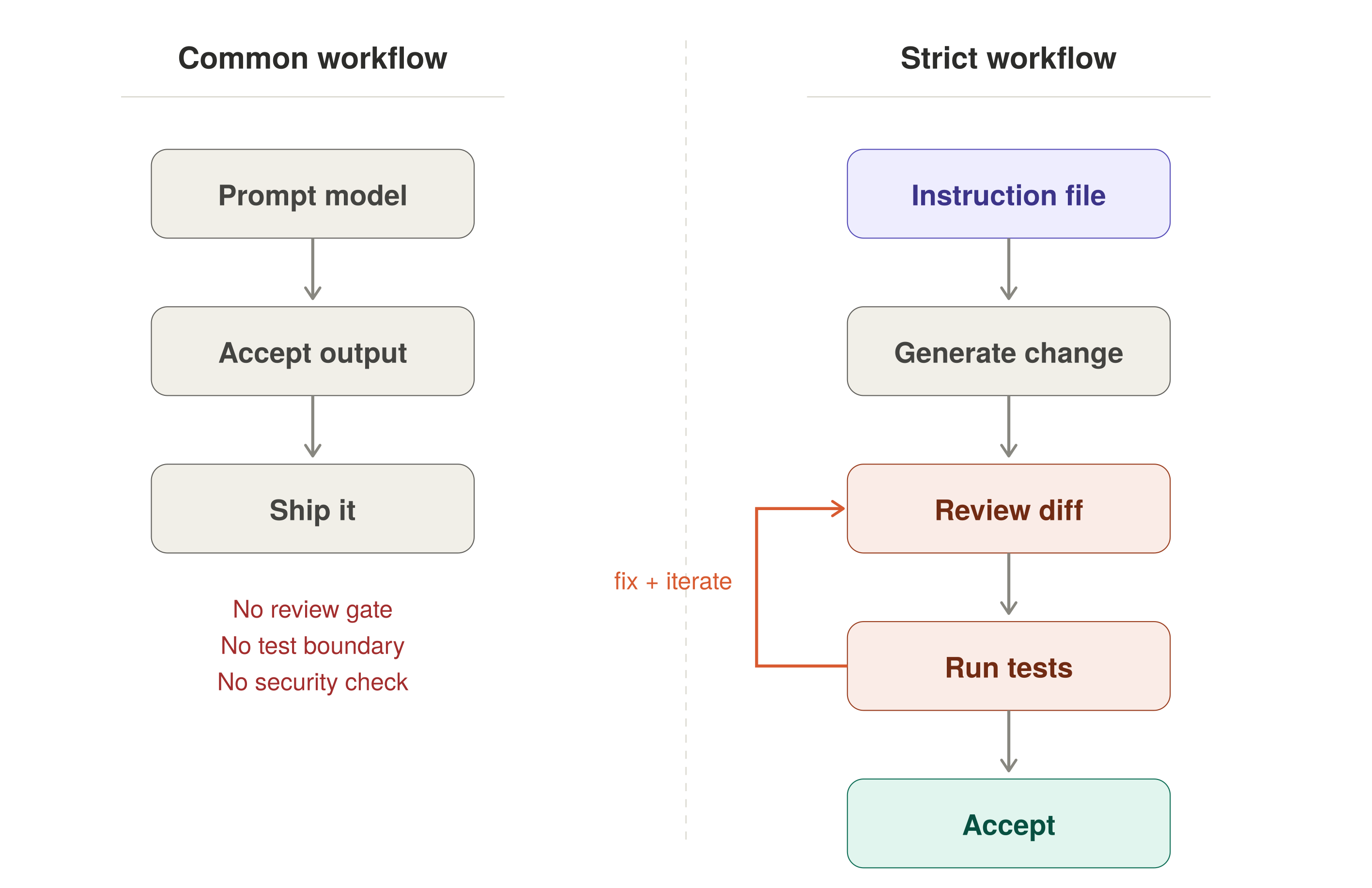
Here is what that looks like in practice. You ask the model to add a new endpoint to a Spring Boot service. It gives you something that compiles. It uses field injection. It catches Exception at the top level. It returns a raw entity instead of a DTO. It skips validation entirely.
None of that is wrong in isolation. All of it is wrong for your project.
That is not a model failure. It is a workflow design failure. When the environment is loose, the model fills in the gaps with generic defaults: architecture assumptions, naming conventions, testing expectations, security boundaries, “good enough” definitions. And because the output often looks clean, those assumptions do not always get challenged early enough.
The fix is not to abandon the tool. The fix is to make the workflow explicit.
Loose Workflow vs. Strict Workflow — side-by-side comparison
Context Is a First-Class Input
AI assistants do not work only from the words you type into a prompt box. They also work from the environment you give them: repository structure, nearby files, naming patterns, framework usage, instruction files, visible tests, and previous edits.
That means project context is not optional background information. It is part of the prompt whether you acknowledge it or not.
This is where many teams leave quality on the table.
Without project-specific instructions, the model defaults to generic competence. It gives you plausible Java, plausible Spring Boot, plausible tests, plausible structure.
Plausible is not the same as aligned.
If your project prefers constructor injection, records for DTOs, explicit validation, no field injection, and no catch-all exception handling, say so. If your team expects tests to change with non-trivial behavior, say so. If certain data, configs, or secrets must never enter prompts or instruction files, say so.
The more important point is this: if you do not encode those rules somewhere durable, the model will make them up on your behalf.
A Good Instruction File Is Not Bureaucracy
Many developers react to project instruction files as if they are process theater.
In reality, a good instruction file is one of the cheapest quality controls you can add to AI-assisted development. It does three useful things:
It reduces repeated prompt overhead.
It pushes the model toward local conventions instead of generic defaults.
It makes team expectations explicit enough to review and improve.
A useful instruction file does not need to be long. It just needs to be concrete. Here is a trimmed example of what one might look like for a Java/Spring Boot project:
Project Instructions
Architecture
Layered: Controller → Service → Repository
DTOs are Java records. Never expose JPA entities in API responses.
Constructor injection only. No field injection.
Code Style
No catch-all catch (Exception e). Handle specific exceptions.
Validate inputs at the controller layer using Jakarta Validation.
Use Optional return types from repositories. No returning null.
Testing
Every non-trivial service method gets a unit test.
Use @WebMvcTest for controller tests, not @SpringBootTest.
Test names follow: should_expectedBehavior_when_condition
Security
No secrets, credentials, or customer data in prompts or instruction files.
Sanitize all model output before rendering or storing.
Treat model-generated SQL or config as untrusted input.
That is not a lot of text. But it changes the working conditions of the model in a meaningful way.
The benefit is not magical obedience. The benefit is fewer avoidable mismatches.
Generation Should Be One Step in a Loop
The most dangerous AI-assisted workflow is “generate and move on.”
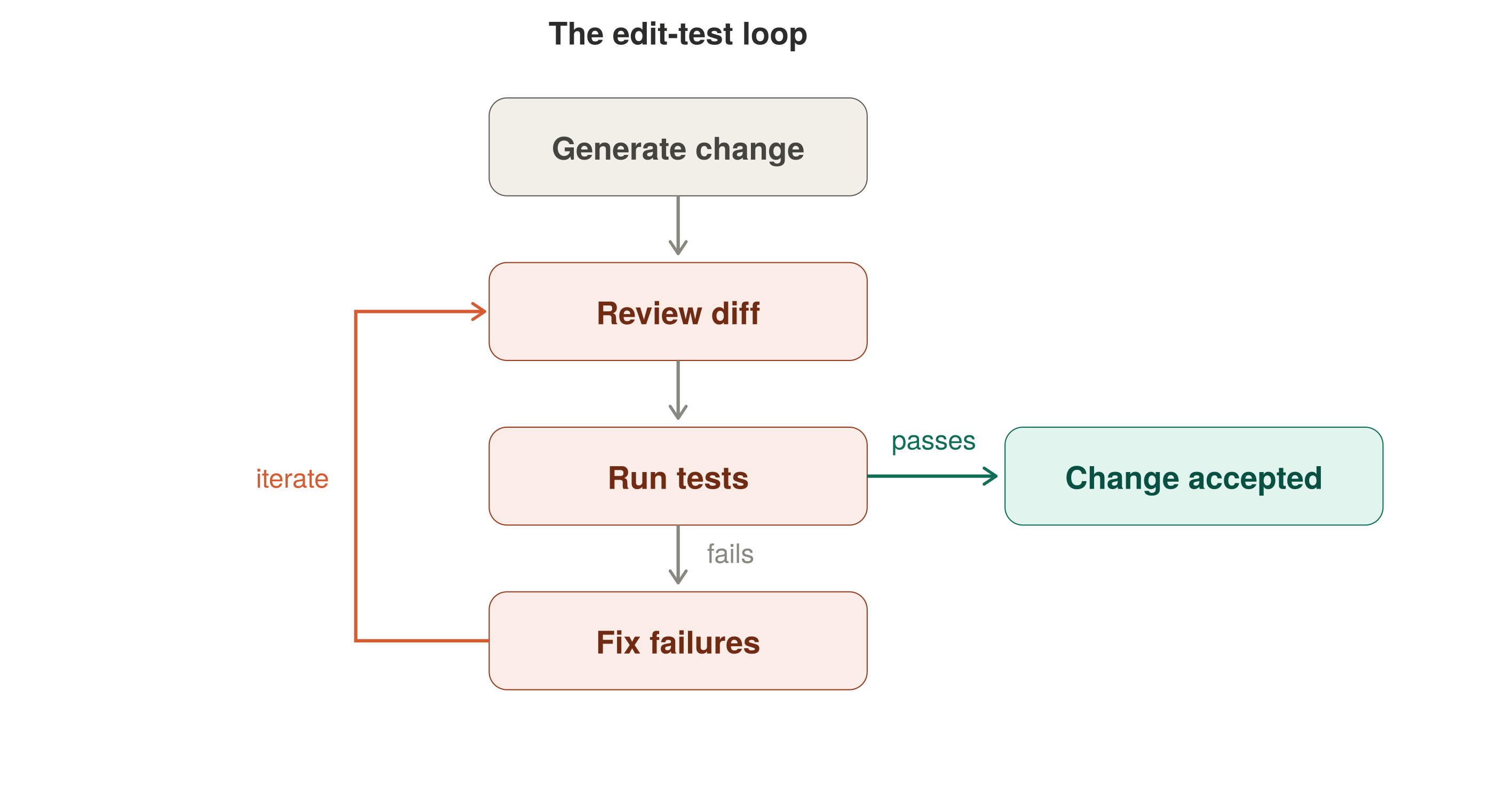
A better default is a visible edit-test loop:
Request or generate the change.
Review the diff.
Run the compiler and tests.
Fix what failed or looked suspicious.
Repeat until the change survives a real gate.
Edit-Test Loop — cyclical flow with iterate-back path
That sounds obvious, but many teams still use AI as if generation were the end of the task rather than the beginning of the review process.
This is where the Java ecosystem helps. The compiler gives fast pressure. Maven gives fast pressure. Tests give fast pressure. Framework wiring gives fast pressure.
That pressure is useful because it turns “looks correct” into “survived contact with the project.”
A passing build still does not prove the design is good. But it does prove the output passed one real boundary instead of just looking polished in the editor.
Testing Is Part of the Prompt, Too
There is a subtle workflow benefit that teams often miss: visible tests help shape AI behavior.
When the model can see what the system expects, the space of acceptable output narrows. That is why failing tests are not just a cleanup mechanism. They are a constraint.
They help convert the model’s task from “write something plausible” to “write something that survives this boundary.”
That is a much healthier way to use the tool. The stronger your edit-test loop, the less likely you are to confuse polished code with integrated code.
Security Hygiene Has to Move Upstream
Another mistake teams make is treating AI workflow security as a later governance topic.
It is not. The first time user input reaches a model, or model output reaches a user or system boundary, security hygiene already matters. That means three things need to happen earlier than many teams expect.
Treat model-bound input as untrusted. If user-provided text is being sent to an LLM, it should be handled like any other untrusted input: null and blank handling, length limits, malformed content policy, logging discipline, and awareness of prompt injection and control content.
Treat model output as data that still requires validation. If the output will be rendered, stored, used in config, or passed into another system, it cannot be trusted just because it came from your own workflow. That means sanitization where appropriate, schema or type validation where possible, no direct execution, and no casual HTML rendering.
Treat context as a data exposure boundary. Teams are often careful about production APIs and credentials, but careless with prompts, instruction files, and editor context. If secrets, customer data, private config, or internal-only operational details should not leave the repo boundary, they should not quietly leak into AI tooling context either.
Good workflow design makes that boundary explicit.
Better AI Use Often Looks More Restrictive
This is the counterintuitive part.
Many developers assume that “better AI usage” means more freedom: bigger prompts, more model autonomy, less friction, and faster acceptance.
In practice, the opposite is often true. Better AI usage often means smaller and clearer tasks, stricter project context, more visible tests, more explicit “do not do this” rules, tighter review before acceptance, and clearer boundaries around sensitive data.
That is not anti-AI. That is what serious tool use looks like.
You do not get better results by pretending the system understands more than it does. You get better results by constraining the space in which it is allowed to help.
What This Changes for Java Teams
For Java teams, this is good news.
The ecosystem already rewards explicit structure, validation, types, build discipline, and test visibility. Those habits map well onto AI-assisted development. But teams have to lean into them.
If you treat AI as a shortcut around discipline, it will magnify sloppiness. If you treat AI as an accelerator inside a disciplined workflow, it can remove a lot of repetitive effort without undermining control.
That is the real difference between “AI helped” and “AI created more work later.”
A Better Question Than “What Prompt Should I Use?”
A more useful question is: “What would have to be true about this workflow for the model to be helpful without becoming a hidden source of risk?”
That leads you toward instruction files, visible conventions, explicit tests, security boundaries, and review discipline. Those things matter more than clever prompt wording in the long run.
Once the workflow improves, the prompts usually get simpler.
Try This in Practice
Pick one small Java task in your current project and do three things before you ask the model for help:
Write or refine a short project instruction file.
Make sure there is a test or compile boundary you will run immediately.
Decide what data or context must not be exposed to the tool.
Then run the change through a strict edit-test loop.
You will learn very quickly whether your current AI problem is model quality or workflow quality. In many teams, it is the second one.
Let me know what you find.
The Coding Café is a reader-supported publication. To receive new posts and support my work, consider becoming a free or paid subscriber.